Getting Help with Canvas
UCSB’s Instructional Applications Group is happy to assist with Canvas questions or meet with you on Zoom to discuss your Canvas course. For questions or to schedule a consult, please email help@collaborate.ucsb.edu.
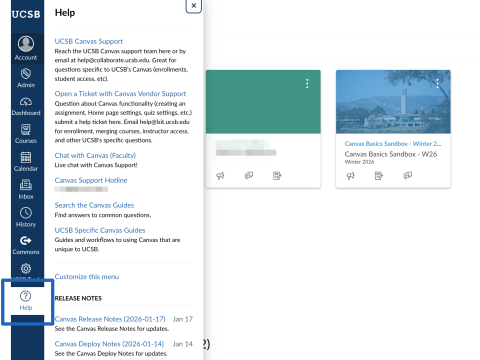
Canvas also provides 24/7 support and can be reached via an email ticket, chat, or phone. You can reach them by clicking on the “Help” icon from within Canvas.
Creating New Course Sites in UCSB Canvas
Each quarter, instructors of record can create new, empty course sites with automatically synced UCSB enrollments by using the UCSB Canvas Course Site creator, as outlined in this help article.
Course site creation is generally available each quarter by Pass 2 of enrollment for that quarter. Prior to that, instructors can create content in a sandbox site. If you do not have a sandbox, would like a new one, or believe you should be listed as instructor of record for a quarter, please submit a help request.
Instructors can import past course content or content from a sandbox into their new course sites following the steps outlined in this help article.
To request a course site for a non-Registrar course or project, please submit a help request.
Documentation and Trainings
UCSB Canvas Support and Knowledge Base: This course in Canvas houses UCSB's support documentation. You can join the course to have it appear on your Dashboard by clicking the option to "Enroll in Course."
Guides: Canvas has many guides for using the various features within Canvas, see Canvas Community Guides.
Training Videos & Thematic Trainings: Canvas training videos and thematic courses can be found in the Instructure Training Services Portal by logging in with your UCSBnetID and password.
Canvas Training Recordings
Introductory
The Student Experience using Canvas
Fundamentals
Communication, Notifications, and Discussions training
Setting up course organization and navigation with Home Page and Modules training
Beyond the Basics
Creating Content With the RCE (Rich Content Editor)
Mastery Paths (Creating course options based on student performance and choice)
Upcoming Canvas Training Sessions
